Who said what
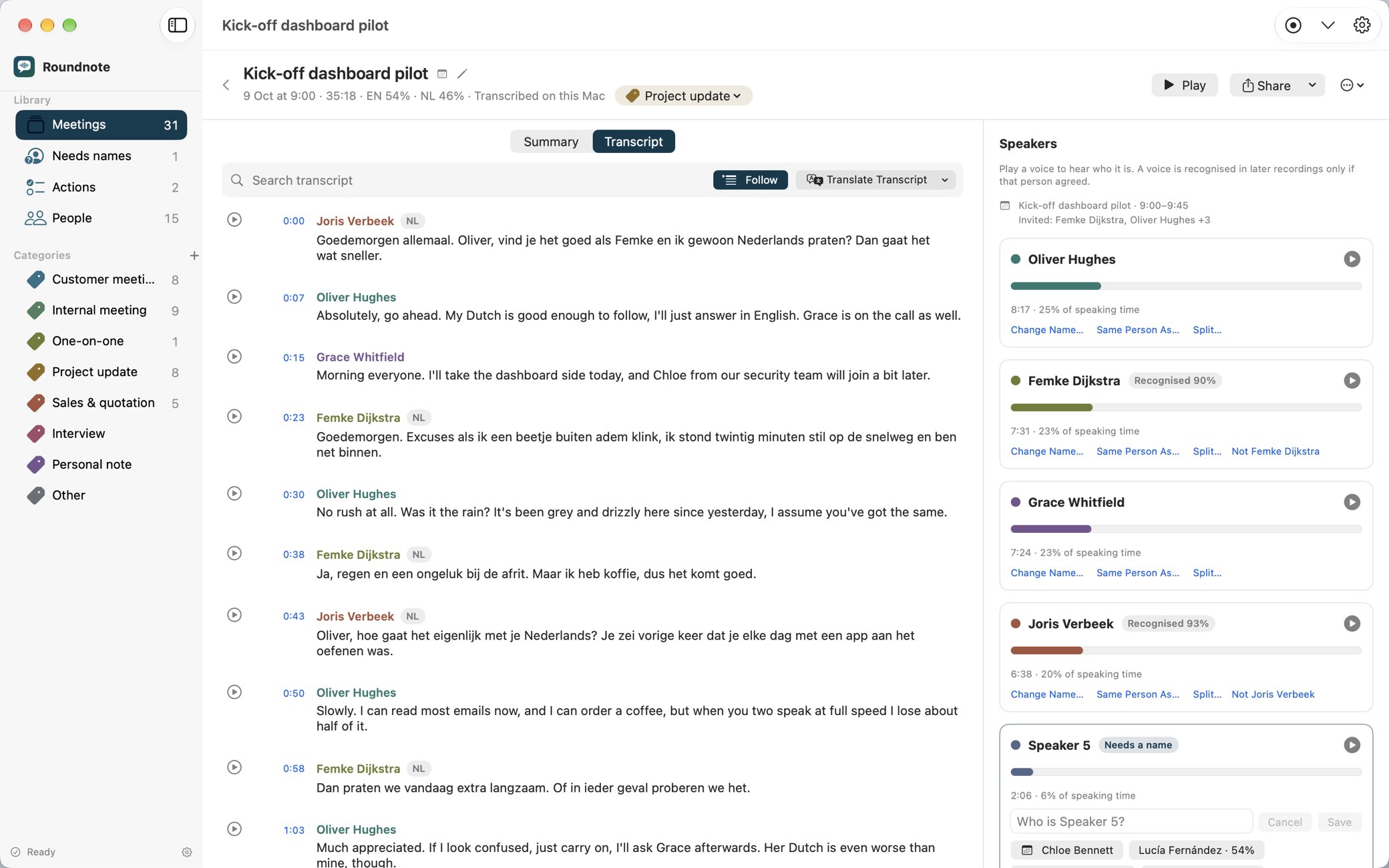
Every voice told apart, also several people around one Mac. The people who agreed are recognised in later meetings.

Meeting notes for Mac
Roundnote records and transcribes your meetings on your Mac, and remembers who said what. Later, find what was agreed in Roundnote, or ask Claude and ChatGPT.
5 meetings free, then €29 once (later €39). No subscription. For Macs with Apple silicon and macOS 26.
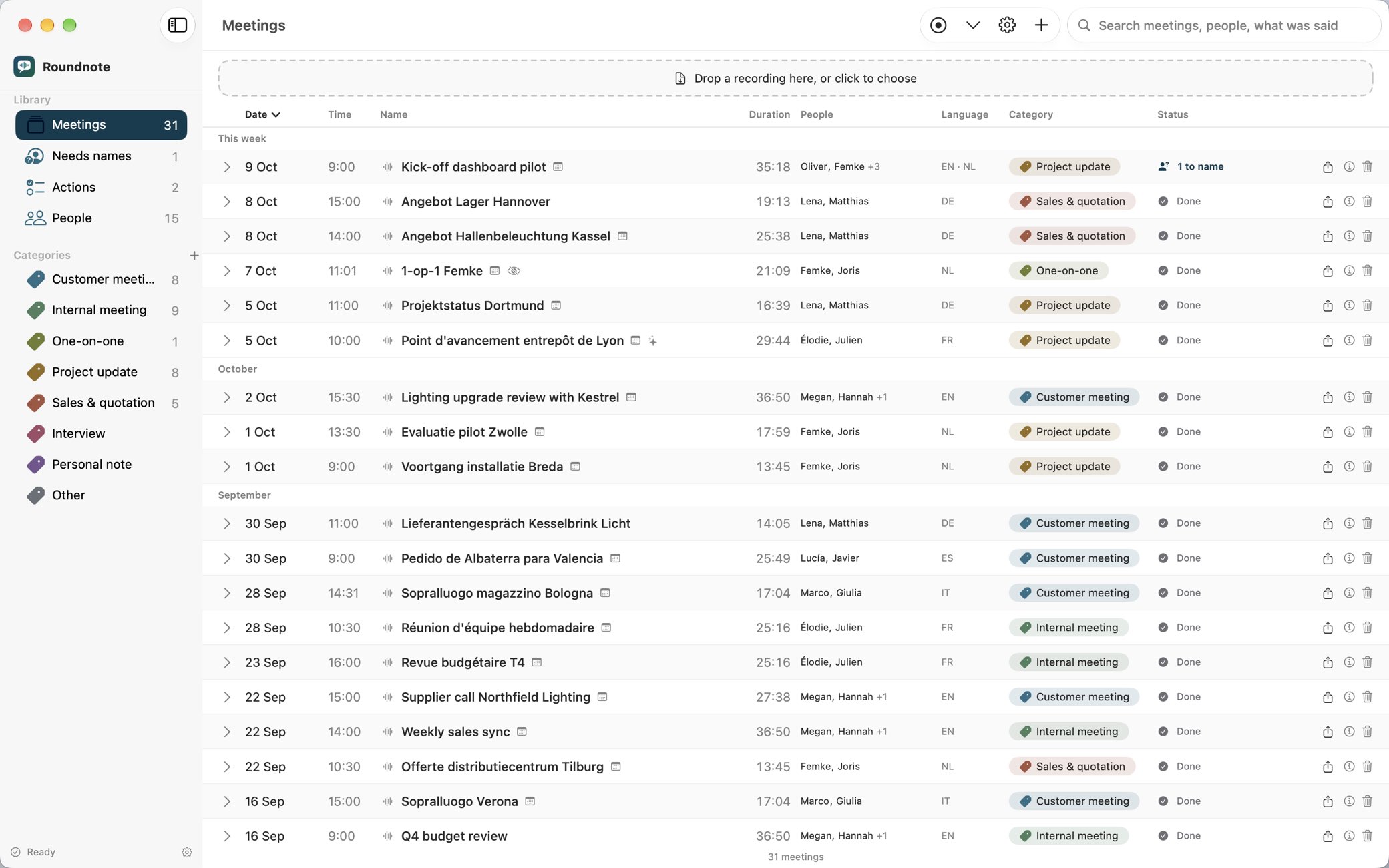
Decisions, promises and figures disappear into notes nobody reads again. Roundnote keeps them, and finds them when you need them.
How it works
A call in Teams, Zoom or any other app, a meeting in a room, or your iPhone. Roundnote reminds you to ask the others first.
Who said what, a summary with the decisions, and every action item with who and by when.
Search every meeting, or ask Claude or ChatGPT what was agreed, weeks later.


Claude, ChatGPT and MCP
Roundnote gives Claude and ChatGPT your meeting history, on your Mac and only when you ask. Ask in your own words; the answer comes from your own meetings.
Features
Every voice told apart, also several people around one Mac. The people who agreed are recognised in later meetings.
Each turn in its own language, translated live or afterwards if you like.
A summary shaped by the kind of meeting, and every action item in one list, on to Reminders.
Search what was said, also in other words or another language, and jump to the moment.
From Mail or Outlook, with no server in between.
Free apps that record anywhere and send the recording to your Mac.
While the meeting runs
A small window beside your call shows who says what, a second or two after it's said, translated if you like.
A preview while you talk. The full transcript follows when the meeting ends.
Click a label to name a voice; the name carries into the meeting.
Into the meeting's main language or one you pick, on your Mac.
⌃⌥M marks a moment from any app. Both steer the summary.
Privacy
Recording, transcribing and recognising voices happen on your Mac. Nothing leaves unless you choose it, and every meeting shows what did.
Try everything on your first 5 meetings. If Roundnote earns its place, buy Pro once.
€0
€29 once, later €39
Bought in the app through the App Store; Apple sets the price in other currencies. After the free meetings, new recordings are kept until you upgrade. An AI service you connect yourself charges you separately.
Made by I-DEV B.V. in the Netherlands. No Roundnote account, and no trackers on this website.
Most tools give you the transcript of one meeting. Roundnote keeps all of them, and lets you ask.
| Roundnote | A transcription app | A cloud note-taker | |
|---|---|---|---|
| Where meetings are processed | On your Mac | Often on your Mac | On the provider's servers |
| Voices recognised in later meetings | Yes, with consent | Usually not | Varies, in the cloud |
| Every action item in one list | Yes, from every meeting | Usually per file | Often |
| Ask across all your meetings | In Roundnote, Claude and ChatGPT | Usually one file at a time | In their own app |
| Meetings that switch language | Each turn in its own language | Varies | Often one language per meeting |
| Price | €29 once | Often once | A subscription, per person |
No. Recording, transcripts, summaries, decisions, action items and search all work in Roundnote on its own. Claude and ChatGPT are for asking across your meetings in your own words, if you use them.
Teams, Zoom, Webex, FaceTime, Slack, Discord and calls in a browser: Roundnote notices when a call starts and records your microphone and the call's sound. A meeting in a room records with Record Now or on your iPhone, iPad or Apple Watch, and any audio or video file can be dropped in.
No. It records on your Mac: your microphone and the sound of the call app. Because the others don't see a bot, tell them you're recording: Roundnote reminds you every time, and Copy Consent Line gives you a line to paste in the chat.
Only you, on your Mac. There's no Roundnote server or account, so we never receive them. A meeting leaves your Mac only when you choose: an AI service you set up, an assistant you ask, an email you send. Each meeting lists where it went, under What left this Mac.
Mostly in where your meetings go. Otter.ai and Fireflies.ai usually add a notetaker to the call, and transcribe and keep your meetings on their servers. Granola doesn't join the call, but transcribes and summarises in the cloud, and doesn't keep the recording. Roundnote transcribes, recognises voices and summarises on your Mac, unless you choose an AI service, and keeps the recording with the transcript. It's bought once; their paid plans are a subscription per person.
Yes. Transcribing and recognising voices run on-device, with the models built into the app, and need no internet connection. Summaries are written on your Mac too, by Apple Intelligence or by Gemma 4, which is a one-time download.
100 languages: 25 European ones with the built-in speech model, including English, Dutch, German, French, Spanish and Italian, and the others through Whisper. Meetings that mix languages work, because each turn's language is recognised. The app itself is in English, Dutch, German, French, Spanish and Italian.
Through Roundnote's MCP server, a small program in the app that the Claude desktop app, Claude Code or the ChatGPT desktop app starts on your Mac; Settings › Assistants adds it. The assistant looks up only what your question needs and sends that to its own service as part of your chat. It never sees voice profiles or meetings set to Hide from Assistants, and each meeting lists it under What left this Mac.
A Mac with Apple silicon and macOS 26 or later. Summaries by Apple Intelligence need Apple Intelligence switched on; Gemma 4 takes about 5 GB of disk space. Prefer a service? Use OpenAI, Azure OpenAI, Groq or any OpenAI-compatible address, or a model server on your own Mac such as Ollama or LM Studio. The iPhone and iPad app needs iOS 18 or iPadOS 18, the Watch app watchOS 11.
No. There's no Roundnote account and no subscription: 5 meetings free, then Pro once, for €29 at launch and €39 after that. Only an AI service you choose to connect has its own account and costs.
No transcript is. Names, crosstalk and poor sound cause mistakes, and summaries and translations can miss or get things wrong. Check what matters against the recording; fixing a line takes a click.
More answers on the support page.
Roundnote is coming to the Mac App Store: 5 meetings free, then €29 once. Questions until then? Write to support@roundnote.eu.